Hard Links vs Soft Links
Comparison
UNIX uses data structures called inodes that contain the metadata about a file.
The names given to files are labels that are linked to these inodes.
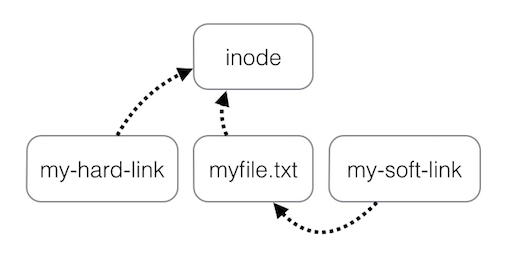
Hard links are other names to the same inode. So this means that files can have multiple names.
Soft links (also called symbolic links) are files that point to the path of another file or directory.
Because of this, deleting one hard link won't actually delete the file. To delete a file, all hard links must be deleted.
The image below that I found on Stack Overflow gives a depiction of the relationship that made it very easy to understand for me.
Creating Hard Links
To create a hard link, the following command can be ran
Creating Soft Links
To create a soft link, the following command can be ran