The TAR Command
What is the TAR Command?
The tar command is used to bundle multiple files and/or directories into a single TAR archive, similar to creating ZIP files.
Using the TAR Command
To use the tar command to create an archive, the following command can be ran
The -cf flag combines the -c flag for creating an archieve and the -f flag for specifying a name for the archive file.
Removing Files From a TAR Archive
To files and directories from a TAR archive, the following command can be ran
Note that this will not work on compressed TAR archives
Adding Files to a TAR Archive
To add files and directories to an existing TAR archive, the following command can be ran
Again, note that this will not work on compressed TAR archives
Preserving Permissions
To preserve permissions when making a TAR archive, attach the -p flag when extracting a TAR archive. This would look something like the following command
Listing TAR Archive Contents
To list the contents of a TAR archive, the following command can be ran
The -tf flag combines the -t flag to list the archive's contents and the -f flag to specify a TAR archive file.
Example
I did this through Git Bash on Windows rather than Bash on my Ubuntu instance running on WSL because I didn't realize that Bash and Git Bash were the same thing, and I don't feel like creating dummy files for my Ubuntu instance.
I ran the following command in Bash to create a TAR archive of the files that make this very site
I created a dummy text file called dummy_file.txt and then add it to the archive by running the following command
Then, to remove the .gitignore, I ran the following command
Finally, to list the contents of the archive, I ran the following command
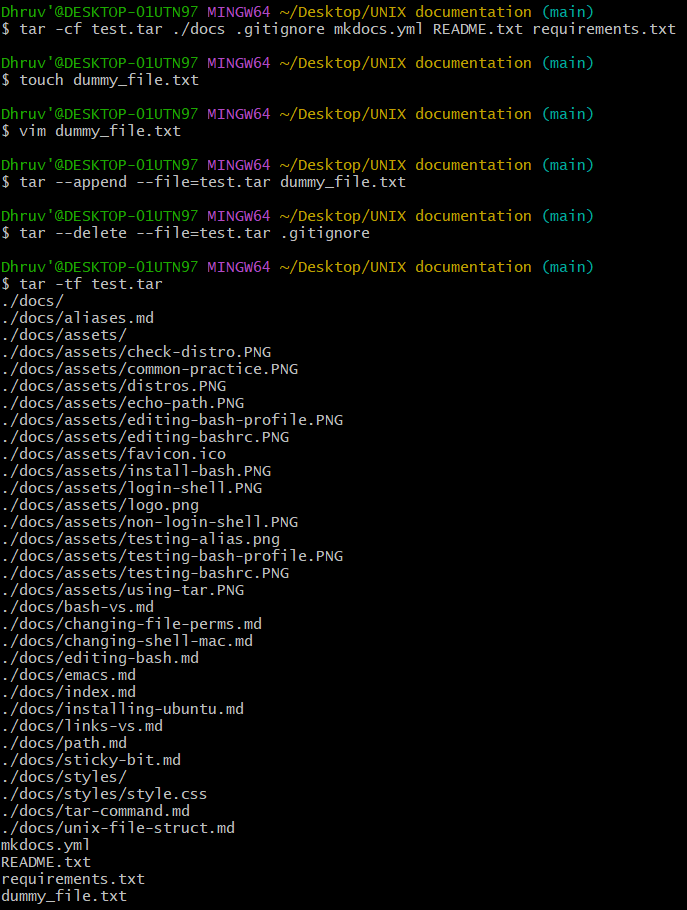
The output at the end makes perfect sense because I added the dummy_file.txt and removed the .gitignore